Navigating international travel often brings a familiar challenge: how to stay connected without breaking the bank or losing touch with your established contacts. For years, travelers faced a dilemma: either endure exorbitant roaming charges from their home provider or swap out their physical SIM card for a local one, often sacrificing their original phone number and the convenience that comes with it. However, the advent of eSIM technology has fundamentally changed this dynamic, offering a seamless solution that allows you to keep your primary phone number active while enjoying affordable, high-speed mobile data abroad.
- The Short Answer: Yes, You Absolutely Can Keep Your Number
- How Dual SIM Technology Works with Your Existing Number
- Managing Calls and Texts While Using an eSIM for Data
- Cost Comparison: eSIM vs. Local SIM vs. Roaming
- When to Activate Your Cellesim eSIM for Optimal Experience
- Step-by-Step Guide: Configuring Your Phone for Dual SIM Use
- Pro Tips for Maximizing Your Dual SIM eSIM Experience
- Beyond the Basics: Device Compatibility and Network Performance
- Frequently Asked Questions about Keeping Your Number with eSIM
Stay Connected Across Europe
Get instant data in 42 countries. Seamless setup and reliable speeds. Trusted by 50,000+ happy customers.
Explore Europe eSIM Plans 🌍The Short Answer: Yes, You Absolutely Can Keep Your Number
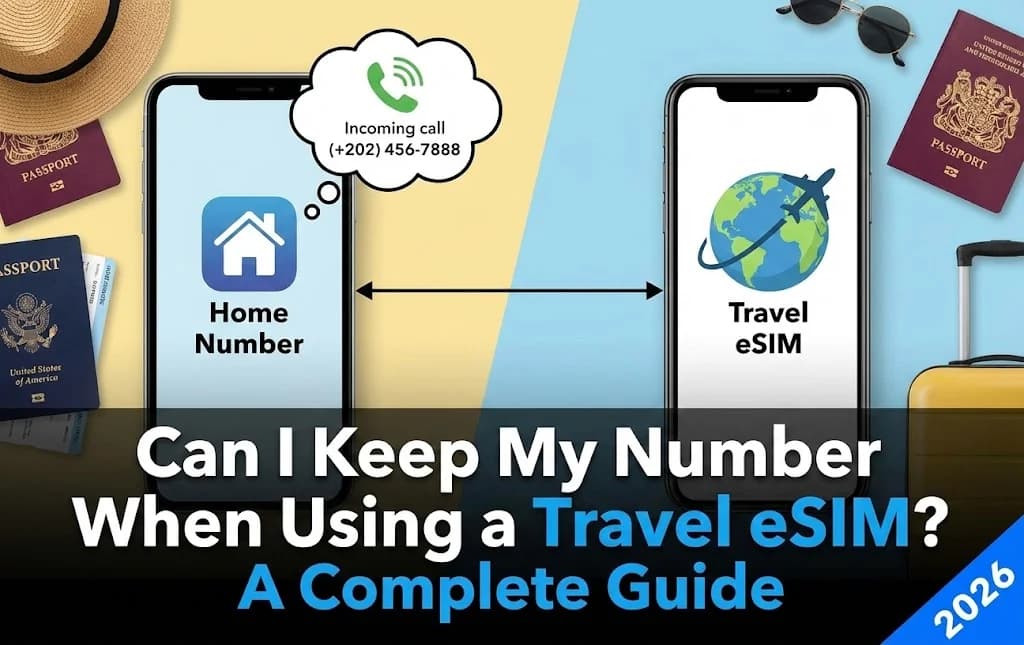
Yes, you absolutely can keep your existing phone number active while using a travel eSIM for data. This is one of the most significant advantages of eSIM technology, especially for international travelers. Modern smartphones with eSIM capability are designed to support dual SIM functionality, meaning your device can operate with two different mobile plans simultaneously: your primary physical SIM (or another eSIM) and your new travel eSIM.
When you activate a Cellesim travel eSIM, it primarily handles your mobile data connection in your destination country. Your existing physical SIM, which holds your regular phone number, remains in your device and can still be used for calls and texts. This setup allows you to receive important calls, text messages, and maintain access to services linked to your primary number, such as banking apps or two-factor authentication, all while benefiting from cost-effective local data rates.
How Dual SIM Technology Works with Your Existing Number
Dual SIM technology is the key to maintaining your primary number while using a travel eSIM. Most newer smartphones, including many iPhone and Android models, support either a physical SIM + eSIM or dual eSIM configuration. This means your phone can register with two different cellular networks simultaneously.
When you travel, you install your Cellesim eSIM. In your phone's settings, you designate your travel eSIM for "Mobile Data" and your primary physical SIM for "Voice & SMS". This intelligent routing ensures that your device uses the affordable eSIM for internet access (maps, messaging, browsing) and your home SIM for any essential calls or texts you might receive from family, friends, or services back home. Your contacts will still reach you on your familiar number, and you avoid the hassle of swapping SIM cards or notifying everyone of a temporary number change.
Managing Calls and Texts While Using an eSIM for Data
Successfully managing your communication preferences is straightforward with an eSIM. Once your Cellesim eSIM is active and set as your data line, you have granular control over how your phone handles calls and texts:
- Incoming Calls: Your primary number remains active, so anyone calling you will reach you as usual. If your home network charges for incoming calls while roaming, these charges will apply. Consider using Wi-Fi calling if available through your home provider to avoid these fees.
- Outgoing Calls: For outgoing calls, you can manually choose which line to use before dialing. For international calls, using VoIP apps like WhatsApp, FaceTime Audio, or Google Voice over your Cellesim data connection is significantly more cost-effective than making traditional calls on your home number.
- Text Messages (SMS): Similarly, incoming SMS will arrive on your primary number. For outgoing SMS, you can usually select which line to send from. Again, messaging apps via your eSIM data are often free or very low cost.
- WhatsApp and Other Messaging Apps: Your WhatsApp account is linked to your phone number, not your SIM card. When you use an eSIM for data, your WhatsApp will continue to function normally, sending and receiving messages over your Cellesim data connection, using your existing number. You won't lose your chat history or contacts. For more details, see our guide on keeping your WhatsApp number with a travel eSIM.
Cost Comparison: eSIM vs. Local SIM vs. Roaming
Let's compare the financial implications and number retention benefits of different connectivity options for international travel:
| Option | Keep Home Number? | Data Cost | Call/SMS Cost | Setup Effort |
|---|---|---|---|---|
| Cellesim eSIM | Yes (Dual SIM) | Low (Local rates) | Home provider rates (only for primary SIM if used) | Instant (Digital) |
| Local Physical SIM | No (or complex Dual SIM setup) | Low (Local rates) | New local number | Medium (Find store, ID required) |
| Home Network Roaming | Yes | Very High (Per MB/Day Pass) | Very High (Per minute/SMS) | None (Automatic) |
As the table illustrates, Cellesim eSIMs offer a compelling balance: you retain the familiarity of your home number without incurring the steep data costs associated with traditional roaming. While a local physical SIM also offers low data costs, it often means temporarily losing access to your primary number, which can be inconvenient for crucial contacts or services.
Find Your Cellesim eSIM Plan
When to Activate Your Cellesim eSIM for Optimal Experience
Timing your eSIM activation can make a difference in your travel experience. You can purchase your Cellesim eSIM plan before you even leave home. Many travelers prefer to install their eSIM while still connected to a stable Wi-Fi network, such as at home or at the airport before departure. This ensures a smooth installation process without relying on potentially unreliable public Wi-Fi abroad.
However, it is crucial to activate the eSIM data plan *only* when you arrive at your destination. Activating it prematurely might start your data plan's validity period earlier than intended. Your phone will then automatically switch to using the Cellesim eSIM for data, while your primary SIM remains active for calls and texts. This approach provides immediate connectivity upon landing, allowing you to use navigation, communicate with transport, or access essential information right away without searching for Wi-Fi or a local SIM shop.
"Using Cellesim allowed me to land in Paris, instantly get online with affordable data, and still receive calls from my office in the UK. It's the perfect balance of convenience and cost-saving."
, A Cellesim Business Traveler
Step-by-Step Guide: Configuring Your Phone for Dual SIM Use
Setting up your smartphone to use a Cellesim eSIM for data while keeping your home number active is straightforward. The exact steps may vary slightly depending on whether you have an iPhone or an Android device, but the general process is similar:
For iPhone Users:
- Install the eSIM: After purchasing your Cellesim plan, you'll receive a QR code or manual details. Go to Settings > Cellular (or Mobile Data) > Add eSIM. Follow the prompts to scan the QR code or enter details manually.
- Label Your Lines: Your iPhone will ask you to label your cellular plans (e.g., "Primary" for your home number, "Travel" for Cellesim). Choose descriptive names.
- Set Default Line: Go to Settings > Cellular > Default Voice Line. Select your Primary (home) line for calls and messages.
- Set Cellular Data: Go to Settings > Cellular > Cellular Data. Select your Travel (Cellesim) line. Ensure "Allow Cellular Data Switching" is OFF to prevent accidental roaming on your primary line.
- Enable Wi-Fi Calling (Optional): If your home provider supports it, enable Wi-Fi Calling for your primary line under Settings > Cellular. This allows you to make/receive calls on your home number over any Wi-Fi or your Cellesim data connection, potentially avoiding roaming charges.
For Android Users:
- Install the eSIM: Go to Settings > Network & internet > SIMs (or Mobile network) > Add eSIM (or Download a SIM). Follow the instructions to scan the QR code or input details.
- Rename SIMs: Label your SIMs (e.g., "Home SIM" and "Travel eSIM") for easy identification.
- Set Preferred SIM for Data: Go to Settings > Network & internet > SIMs. Under "Preferred SIM for", select your Travel eSIM for "Mobile data".
- Set Preferred SIM for Calls/SMS: Under the same "Preferred SIM for" section, select your Home SIM for "Calls" and "SMS messages".
- Check Roaming: Ensure data roaming is disabled for your Home SIM to prevent unexpected charges.
For a detailed guide on eSIM installation, refer to our Cellesim eSIM installation guide for iPhone and Android.
Pro Tips for Maximizing Your Dual SIM eSIM Experience
To make the most of your travel eSIM and dual SIM setup, consider these expert tips:
- Monitor Data Usage: Regularly check your Cellesim data usage through your phone settings or the Cellesim portal. This helps you stay within your plan limits and top up if necessary. Our guide on checking eSIM data usage provides more details.
- Disable Data Roaming on Primary SIM: This is critical. Double-check that data roaming is OFF for your primary physical SIM. This prevents your phone from accidentally using your home network for data, which can lead to significant unexpected charges.
- Inform Contacts: Briefly inform close contacts (family, colleagues) that you'll be using a travel eSIM for data and that they can still reach you on your regular number for calls and texts, or via messaging apps.
- Use Wi-Fi Calling: If your home carrier supports Wi-Fi Calling, enable it. This allows you to make and receive calls on your primary number at your home network's rates (often free for calls to your home country) when connected to any Wi-Fi network, or even over your Cellesim data connection.
- App Permissions: Some apps might default to using a specific SIM for calls/messages. Review your app settings if you encounter any issues.
Beyond the Basics: Device Compatibility and Network Performance
While the concept of keeping your number with an eSIM is clear, ensuring your device is compatible is the first step. Most modern smartphones, particularly those released after 2018, now support eSIM technology. You can quickly check if your device is compatible using our eSIM checker tool.
Once compatibility is confirmed, consider network performance. Cellesim partners with leading local carriers in over 200 countries to provide reliable 4G/5G speeds. This means you get access to the same fast networks that local residents use, enabling smooth browsing, streaming, and video calls. Unlike some roaming agreements that might prioritize cost savings over speed, a Cellesim eSIM aims to deliver optimal connectivity. You can explore the specific network partners and coverage details for your destination on the Cellesim How Our Network Works page or visit the official tourism board website for your destination (e.g., Italy Tourism) for more travel insights.
Ready for Seamless Connectivity on Your Next Trip?
Keep your number, get affordable data, and travel without boundaries.
Start Your Connected JourneyTrusted by 50,000+ travelers worldwide. 24/7 Support: [email protected]
Frequently Asked Questions about Keeping Your Number with eSIM
Will my home phone number still work for calls and texts if I use an eSIM for data?
Yes, your home phone number will continue to work for both incoming and outgoing calls and text messages. Your smartphone's dual SIM capability allows your primary SIM (with your home number) to remain active alongside your Cellesim eSIM, which you'll configure for mobile data use.
How do I make sure my phone uses the eSIM for data and my main SIM for calls?
After installing your Cellesim eSIM, go to your phone's settings (Cellular/Mobile Data on iPhone, Network & Internet/SIMs on Android). You can then designate your Cellesim eSIM as the primary line for "Mobile Data" and your physical SIM for "Voice" and "SMS."
Will using an eSIM for data incur roaming charges on my home number?
As long as you explicitly disable data roaming for your primary physical SIM in your phone's settings, you will not incur roaming charges for data. Any calls or SMS made or received on your primary number will be subject to your home provider's international roaming rates for voice and text, not data.
Can I use WhatsApp with my original number when connected via a Cellesim eSIM?
Absolutely. Your WhatsApp account is tied to your phone number, not the active data connection. When you use your Cellesim eSIM for internet access, WhatsApp will simply use that data connection to send and receive messages, keeping your existing chats and contacts intact.
What if my phone only supports one SIM (no dual SIM)?
If your phone is an older model or does not support dual SIM functionality, you would generally have to choose between your physical SIM (and home number) or the eSIM. However, most modern phones that support eSIMs also support dual SIM functionality. Use our eSIM checker to verify your device's capabilities.
Is it complicated to switch between my home number and the eSIM for calls/texts?
No, it is generally very simple. Most smartphones allow you to easily select which line to use when making an outgoing call or sending a text message, often with a quick tap on the dialer screen. Incoming calls and texts will automatically route to the correct number.