
































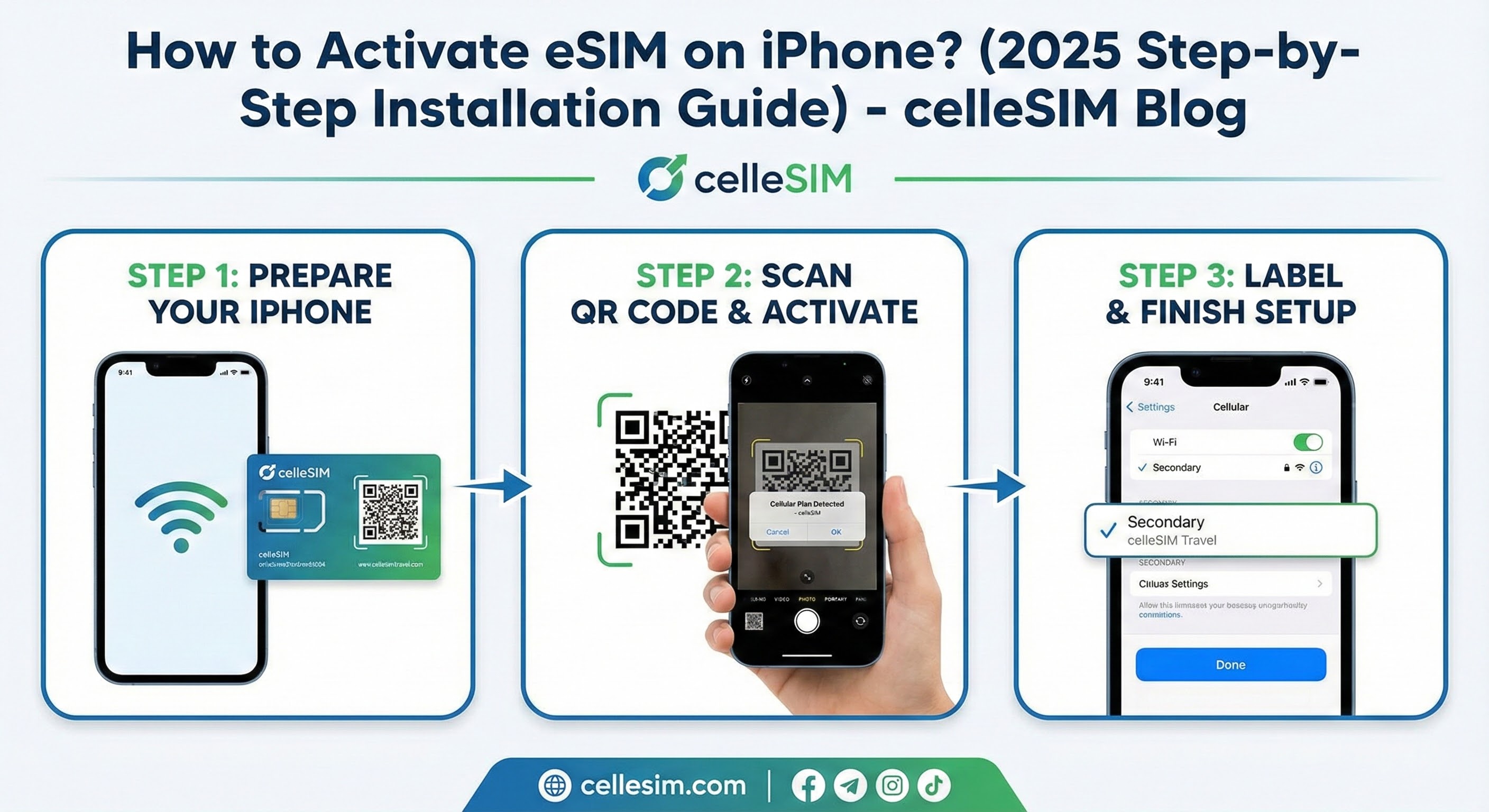

You’ve purchased an eSIM for your upcoming trip, and the QR code has arrived in your email. But there’s a catch: The QR code is on your phone screen,...
Land
A-B
C-E
F-H
I-Z
 Afghanistan
 Albanië
 Algerije
 Amerikaanse Maagdeneilanden
 Andorra
 Anguilla
 Antigua & Barbuda
 Argentinië
 Armenië
 Australië
 Azerbeidzjan
 Bahamas
Onmiddellijke activering
Hoge internetsnelheden
Hotspot delen
Geen verborgen kosten

Afghanistan
VAN $4.60
4G
Netwerkaanbieder:
Afghan Wireless Afghanistan, Etisalat, Roshan Afghanistan
- 11 abonnementsopties beschikbaar
- 5G en hotspot-compatibel
- Activering binnen 2 minuten
- 24x7 klantenservice
- 100% geld-terug-garantie

Albanië
VAN $0.99
4G
Netwerkaanbieder:
Vodafone
- 27 abonnementsopties beschikbaar
- 5G en hotspot-compatibel
- Activering binnen 2 minuten
- 24x7 klantenservice
- 100% geld-terug-garantie

Algerije
VAN $0.50
4G
Netwerkaanbieder:
Mobilis, Ooredoo, Optimum Telecom Algeria Spa
- 24 abonnementsopties beschikbaar
- 5G en hotspot-compatibel
- Activering binnen 2 minuten
- 24x7 klantenservice
- 100% geld-terug-garantie

Amerikaanse Maagdeneilanden
VAN $6.10
5G
Netwerkaanbieder:
T-Mobile
- 21 abonnementsopties beschikbaar
- 5G en hotspot-compatibel
- Activering binnen 2 minuten
- 24x7 klantenservice
- 100% geld-terug-garantie

Andorra
VAN $2.50
5G
Netwerkaanbieder:
Mobiland, STA Andorra
- 25 abonnementsopties beschikbaar
- 5G en hotspot-compatibel
- Activering binnen 2 minuten
- 24x7 klantenservice
- 100% geld-terug-garantie

Anguilla
VAN $5.99
4G
Netwerkaanbieder:
FLOW
- 9 abonnementsopties beschikbaar
- 5G en hotspot-compatibel
- Activering binnen 2 minuten
- 24x7 klantenservice
- 100% geld-terug-garantie

Antigua & Barbuda
VAN $6.50
4G
Netwerkaanbieder:
Digicel Antinua and Barbuda, FLOW
- 10 abonnementsopties beschikbaar
- 5G en hotspot-compatibel
- Activering binnen 2 minuten
- 24x7 klantenservice
- 100% geld-terug-garantie

Argentinië
VAN $2.50
4G
Netwerkaanbieder:
Claro, Movistar, Telefonica Moviles Argentina S.A.
- 27 abonnementsopties beschikbaar
- 5G en hotspot-compatibel
- Activering binnen 2 minuten
- 24x7 klantenservice
- 100% geld-terug-garantie

Armenië
VAN $0.50
4G
Netwerkaanbieder:
Orange, UCOM Armenia, Ucom
- 28 abonnementsopties beschikbaar
- 5G en hotspot-compatibel
- Activering binnen 2 minuten
- 24x7 klantenservice
- 100% geld-terug-garantie

Australië
VAN $0.50
5G
Netwerkaanbieder:
OPTUS MOBILE PTY LTD, Optus, Vodafone
- 17 abonnementsopties beschikbaar
- 5G en hotspot-compatibel
- Activering binnen 2 minuten
- 24x7 klantenservice
- 100% geld-terug-garantie

Azerbeidzjan
VAN $3.40
5G
Netwerkaanbieder:
Azercell, Azercell Azerbaijan, Azercell Telecom LLC
- 19 abonnementsopties beschikbaar
- 5G en hotspot-compatibel
- Activering binnen 2 minuten
- 24x7 klantenservice
- 100% geld-terug-garantie

Bahamas
VAN $11.32
4G
Netwerkaanbieder:
Aliv
- 21 abonnementsopties beschikbaar
- 5G en hotspot-compatibel
- Activering binnen 2 minuten
- 24x7 klantenservice
- 100% geld-terug-garantie
Regio










Onmiddellijke activering
Hoge internetsnelheden
Hotspot delen
Geen verborgen kosten
Afrika (29 Landen)
VAN $9.69
5G
Netwerkaanbieder:
Airtel, AirtelTigo, Cell C
- 3 abonnementsopties beschikbaar
- 5G en hotspot-compatibel
- Activering binnen 2 minuten
- 24x7 klantenservice
- 100% geld-terug-garantie
Azië (20 Landen)
VAN $6.12
5G
Netwerkaanbieder:
3, AirTel, CTM
- 9 abonnementsopties beschikbaar
- 5G en hotspot-compatibel
- Activering binnen 2 minuten
- 24x7 klantenservice
- 100% geld-terug-garantie
Australië en Nieuw-Zeeland
VAN $1.87
5G
Netwerkaanbieder:
Optus, Spark
- 10 abonnementsopties beschikbaar
- 5G en hotspot-compatibel
- Activering binnen 2 minuten
- 24x7 klantenservice
- 100% geld-terug-garantie
Balkan (5+ gebieden)
VAN $2.55
5G
Netwerkaanbieder:
A1, T-Mobile, Tele2
- 9 abonnementsopties beschikbaar
- 5G en hotspot-compatibel
- Activering binnen 2 minuten
- 24x7 klantenservice
- 100% geld-terug-garantie
Caribisch gebied (24 Landen)
VAN $5.10
5G
Netwerkaanbieder:
Altice, Antel, Claro
- 5 abonnementsopties beschikbaar
- 5G en hotspot-compatibel
- Activering binnen 2 minuten
- 24x7 klantenservice
- 100% geld-terug-garantie
Centraal-Azië
VAN $1.02
4G
Netwerkaanbieder:
Beeline, Hutch, Jazz
- 8 abonnementsopties beschikbaar
- 5G en hotspot-compatibel
- Activering binnen 2 minuten
- 24x7 klantenservice
- 100% geld-terug-garantie
China (vasteland HK Macau)
VAN $1.53
5G
Netwerkaanbieder:
CTM, China Unicom, csl
- 13 abonnementsopties beschikbaar
- 5G en hotspot-compatibel
- Activering binnen 2 minuten
- 24x7 klantenservice
- 100% geld-terug-garantie
Europa (42 Landen)
VAN $5.44
5G
Netwerkaanbieder:
3, 7acht, A1
- 6 abonnementsopties beschikbaar
- 5G en hotspot-compatibel
- Activering binnen 2 minuten
- 24x7 klantenservice
- 100% geld-terug-garantie
Zuid-Amerika (17 Landen)
VAN $9.69
5G
Netwerkaanbieder:
Antel, Claro, Digicel
- 5 abonnementsopties beschikbaar
- 5G en hotspot-compatibel
- Activering binnen 2 minuten
- 24x7 klantenservice
- 100% geld-terug-garantie
Midden-Oosten (11 Landen)
VAN $11.90
5G
Netwerkaanbieder:
Bakcell, Beeline, Etisalat
- 3 abonnementsopties beschikbaar
- 5G en hotspot-compatibel
- Activering binnen 2 minuten
- 24x7 klantenservice
- 100% geld-terug-garantie
Noord-Amerika (3 Landen)
VAN $1.95
5G
Netwerkaanbieder:
AT&T, Bell, Movistar
- 16 abonnementsopties beschikbaar
- 5G en hotspot-compatibel
- Activering binnen 2 minuten
- 24x7 klantenservice
- 100% geld-terug-garantie
Wereldwijde eSIM (127 Landen)
VAN $12.92
5G
Netwerkaanbieder:
3, 7acht, A1
- 6 abonnementsopties beschikbaar
- 5G en hotspot-compatibel
- Activering binnen 2 minuten
- 24x7 klantenservice
- 100% geld-terug-garantie